
HRIS vs HRMS vs HCM Difference 2026: HRIS stores data, HRMS adds workflows, HCM is fully strategic. An HR tech expert explains the real differences — and which level is right for your headcount.
HRIS vs HRMS vs HCM Difference 2026: Which System Does Your Business Actually Need?
HRIS vs HRMS vs HCM Difference 2026: What you actually need by headcount?
Short answer:
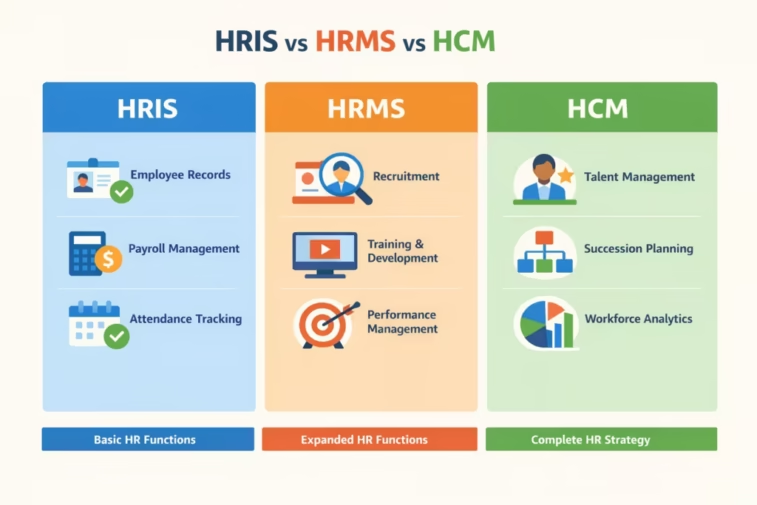
HRIS vs HRMS vs HCM Difference 2026: Don’t get hung up on the acronyms. Most “HRIS,” “HRMS,” and “HCM” products today overlap a lot. Think in tiers:
- HRIS = the people database and core record-keeping system.
- HRMS = HRIS + core operations like payroll, time & attendance, and basic benefits workflows.
- HCM = HRIS/HRMS + talent & workforce strategy (recruiting, performance, learning, analytics, planning).
Most small and midsize businesses are well-served by a modern HRIS/HRMS with payroll; full HCM capabilities matter more as you pass roughly 150–250 employees and add dedicated HR/talent teams.
HRIS vs HRMS vs HCM Difference 2026: Below is a clear breakdown, a simple way to choose by headcount, and what to look for in 2026.
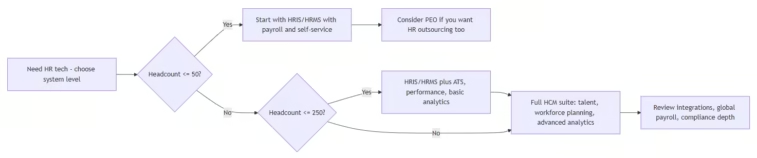
High-level decision flow
1. What the terms actually mean in 2026
HRIS vs HRMS vs HCM Difference 2026: Vendors use these terms loosely, so focus on scope, not labels.
- HRIS (Human Resource Information System)
- Core job: a digital people database and record-keeping system that stores and organizes employee data and basic HR info. It’s often the single source of truth for names, job details, comp, benefits, time-off balances, and documents.
- Typical capabilities:
- Employee database & org chart/reporting.
- Document storage (contracts, policies, acknowledgments).
- Employee self-service (update info, view pay/PTO).
- Basic reporting (headcount, demographics, basic compliance reports).
- Many modern HRIS platforms also include ATS, onboarding, performance, and time/attendance—but at their core, they’re about data + records.
- HRMS (Human Resource Management System)
- Builds on the HRIS by adding operational/transactional HR modules, especially payroll, time & attendance, and benefits administration. It’s about running day-to-day HR processes.
- Typical capabilities (in addition to HRIS functions):
- Payroll processing and tax filing (or deep integration with payroll).
- Time tracking, attendance, scheduling, leave management.
- Benefits enrollment, administration, and compliance support.
- Often extends to basic applicant tracking (ATS), onboarding workflows, and performance management.
- HCM (Human Capital Management)
- Broadest category: combines HRIS/HRMS with strategic talent and workforce features across the employee lifecycle. It supports recruiting, development, performance, compensation, and analytics with a “hire-to-retire” view.
- Typical capabilities (everything in HRIS/HRMS plus):
- End-to-end talent: recruiting/ATS, onboarding, performance, compensation, learning/LMS, career/succession planning.
- Workforce planning and analytics (e.g., labor forecasting, skills gaps, turnover/retention analysis).
- Advanced/compliance and analytics (e.g., pay equity, labor distribution reporting).
- Often supports larger/more complex organizations: multi-entity, global payroll, deeper integrations.
2. Key functional differences
- Data vs. workflows vs. strategy
- HRIS: Primarily data storage and access. Great for eliminating spreadsheets and keeping records accurate and compliant.
- HRMS: Adds process workflows (payroll runs, time-off approvals, benefits open enrollment).
- HCM: Adds strategy: talent pipelines, skills planning, deeper people analytics, and long-term workforce decision-making.
- Scope
- HRIS: Core HR record-keeping and basic self-service.
- HRMS: HRIS + payroll/time/benefits/ATS/performance—consolidates multiple HR functions into one system.
- HCM: HRIS/HRMS + talent + workforce planning + advanced analytics; can serve as a strategic “system of record” across the employee lifecycle.
- How vendors actually label products today
- Many SMB-oriented platforms (e.g., BambooHR) call themselves an HRIS but include ATS, onboarding, performance, payroll, time, benefits—i.e., they span HRIS/HRMS and some HCM features.
- Midmarket/enterprise vendors (e.g., ADP, Paychex, Paylocity) often brand as HCM because they offer broad, end-to-end suites for larger organizations.
3. Which level do you need by headcount?
HRIS vs HRMS vs HCM Difference 2026: Think in stages. Use this as a practical guide, not a hard rule.
- 1–50 employees: Start with HRIS/HRMS (with payroll)
- Priorities:
- Clean employee records and document storage.
- Accurate payroll and tax filings.
- Basic time off and PTO tracking.
- Simple onboarding and self-service so employees can update their own info.
- You likely don’t need heavy-duty talent modules or complex analytics yet.
- Options:
- Look for “all-in-one” HRIS/HRMS that includes or integrates payroll, benefits, and basic ATS. Many vendors target exactly this band.
- Consider:
- A PEO (Professional Employer Organization) if you want HR/benefits/payroll outsourcing and compliance support wrapped in one.
- Priorities:
- 50–150 employees: HRIS/HRMS with targeted HCM features
- Priorities (everything in the smaller tier, plus):
- Better recruiting (ATS) and structured onboarding.
- Performance reviews and basic goal management.
- More robust reporting (e.g., comp, turnover, diversity).
- Time & attendance and scheduling if you have hourly/shift-based teams.
- Options:
- A strong HRIS/HRMS platform that includes ATS, performance, and solid analytics is usually enough. Many vendors classify this as “HCM,” but functionally it’s a modern HRIS/HRMS suite.
- Priorities (everything in the smaller tier, plus):
- 150–250+ employees: Full HCM suite becomes valuable
- Priorities (everything above, plus):
- Consistent performance and compensation management.
- Learning management (LMS) and development tracking.
- Deeper workforce planning and analytics (e.g., labor forecasting, internal mobility).
- More complex benefits, compliance, and possibly multi-entity or multi-state payroll.
- Options:
- Full HCM suites designed for midsize/larger organizations—often with dedicated support, more configurable workflows, and broader integrations.
- Priorities (everything above, plus):
- 1,000+ employees: Enterprise HCM
- Priorities:
- Global payroll and entities, complex org structures.
- Enterprise-grade security, governance, and role-based access.
- Advanced analytics and planning (scenario modeling, skills inventories).
- Deep integrations with ERPs, finance systems, and broader tech stacks.
- Options:
- Large-scale HCM platforms from major vendors; often require more implementation and change management but support strategic HR at scale.
- Priorities:
4. What to look for (by tier)
HRIS vs HRMS vs HCM Difference 2026: For HRIS/HRMS (most small to midsize companies):
- Must-have:
- Employee database with complete records (job, comp, benefits, PTO, documents).
- Employee & manager self-service (profile updates, PTO requests, basic approvals).
- Payroll (native or tightly integrated) and tax filing support.
- Core compliance reports and document retention.
- Nice-to-have:
- ATS and onboarding workflows.
- Time & attendance/scheduling for hourly workers.
- Basic performance and simple analytics.
For full HCM (growing midsize to enterprise):
- Must-have:
- All HRIS/HRMS capabilities above, plus:
- Robust ATS and onboarding/offboarding workflows.
- Performance management and compensation planning.
- Learning and development (LMS) and skills tracking.
- Workforce planning and advanced analytics (turnover, internal mobility, labor distribution).
- Scalable security, audit trails, and integrations.
- Nice-to-have:
- AI-assisted recommendations (sourcing, career pathing, skills matching).
- Pay equity and compliance dashboards.
5. Practical selection framework (step-by-step)
- Step 1: List your must-solve problems
- Examples: “payroll is too manual,” “we’re drowning in spreadsheets for PTO,” “hiring is ad hoc,” “we can’t run performance reviews consistently,” “we lack visibility into turnover or skills gaps.”
- Match each problem to a capability bucket (data, workflow, strategy) to clarify whether HRIS, HRMS, or HCM features are what you actually need.
- Step 2: Check your headcount and HR structure
- Small HR team (1–3 people, or HR as a part-time role): start with a focused HRIS/HRMS that handles core HR + payroll.
- Dedicated HR/talent/recruiting roles: look for HRIS/HRMS with good ATS, onboarding, and performance; consider fuller HCM as you grow.
- HR centers of excellence and analysts: prioritize HCM suites with strong analytics, planning, and integrations.
- Step 3: Decide: buy vs. outsource
- If you want software but will run HR in-house: prioritize HRIS/HRMS or HCM software that you own/configure.
- If you want HR/benefits/payroll handled for you: look at PEO or HRO offerings that bundle HCM-like capabilities with services. HRIS vs HRMS vs HCM Difference 2026: Many vendors offer both.
- Step 4: Demos and checklists
- Ask vendors to map their product labels (HRIS/HRMS/HCM) to actual features so you see what you’re getting. Don’t rely on acronyms; confirm modules.
- Ask specifically about:
- Data: Where is the “system of record” and how does payroll/time/benefits connect?
- Workflows: Who does what in key processes (hire, pay, review, leave, offboard)?
- Analytics: What standard reports/dashboards exist, and can you build your own?
- Integrations: How does it connect to your accounting/ERP, SSO, and other tools?
- Scalability: How well does the platform support your next 2–3x headcount?
- Step 5: Future-proof for the next stage
- Choose a platform that can grow with you (e.g., add modules like ATS or LMS later) without forcing a migration. HRIS vs HRMS vs HCM Difference 2026: Vendors that serve both small and midsize companies often design for this growth path.
6. Common myths to ignore
- “We must pick HCM to be strategic.”
- You can be strategic with a solid HRIS/HRMS and good processes; HCM simply makes more advanced tools available at scale.
- “HRIS is too basic for us.”
- Modern HRIS products often include ATS, performance, and analytics—the label doesn’t tell the whole story. Focus on features.
- “HRMS is outdated; everything is HCM now.”
- In practice, HRMS features are rolled into what vendors call HCM. HRIS vs HRMS vs HCM Difference 2026: What matters is whether the system covers your required modules, not the acronym.
7. Quick reference summary
- HRIS
- Best for: Moving off spreadsheets, centralizing employee data, and basic HR record-keeping.
- Focus: Data storage, documents, basic self-service, reporting.
- Typical fit: 1–50 employees; also fine as the foundation at any size.
- HRMS
- Best for: Automating core HR operations—payroll, time & attendance, benefits enrollments, plus basic ATS/performance.
- Focus: Day-to-day HR workflows and transactional efficiency.
- Typical fit: ~50–250 employees (or any org wanting a single system for core HR + payroll).
- HCM
- Best for: Strategic talent and workforce management across the employee lifecycle—recruit to retire.
- Focus: Talent management, workforce planning, advanced analytics, often for larger/more complex orgs.
- Typical fit: ~150–250+ employees, or any org where talent and analytics are business-critical.
Bottom line
- If you’re under ~150 employees, you likely need a strong HRIS/HRMS with payroll and self-service—what some vendors call HCM. HRIS vs HRMS vs HCM Difference 2026: Prioritize ease of use, solid payroll/time/benefits, and basic reporting.
- As you pass ~150–250 employees and build out HR/talent functions, start prioritizing full HCM capabilities—especially around talent, learning, compensation, and workforce planning—while keeping your core HRIS/HRMS processes running smoothly.
- Ignore the marketing battle over acronyms; HRIS vs HRMS vs HCM Difference 2026: choose the level that matches your current headcount, HR maturity, and must-solve problems—then pick a vendor that delivers those features at a price and complexity you can sustain.