
Paying for both and still unsure? Our Copilot vs Cursor AI coding assistant breakdown in 2026 cuts through the hype — winner by language, workflow & value for money.
Copilot vs Cursor AI Coding Assistant 2026 — Who Wins?
The definitive Copilot vs Cursor AI coding assistant comparison in 2026 — tested on autocomplete, code quality, speed & pricing. Find out which tool makes you ship faster.
📋 Short answer (2026 in a nutshell)
Tested by real developers. Compare GitHub Copilot vs Cursor AI Coding Assistant in 2026 — real code output, IDE integration, team plans & AI model quality. Updated for the latest releases.
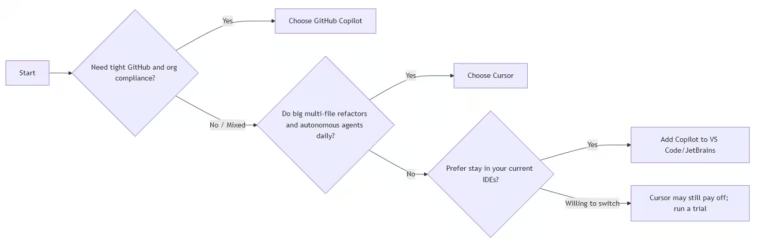
- Choose GitHub Copilot if: you live in GitHub/JetBrains/VS Code, want minimal workflow disruption, and you need enterprise-grade controls (compliance, data residency, SAML SSO, IP indemnity). Pro is $10/mo but new sign-ups are temporarily paused as of April 20, 2026; Business/Enterprise are sold for organizations.
- Choose Cursor if: you want an AI-first IDE (VS Code–style) with aggressive autocomplete (Supermaven), multi-file editing, and powerful autonomous agents; you’re okay with a dedicated editor and higher per-seat cost for the upper tiers. Paid plans start at $20/mo (Pro), with Pro+ at $60 and Ultra at $200, plus Teams at $40/user/mo.
High-level decision flow
1. What GitHub Copilot is in 2026
Core idea
Copilot vs Cursor AI Coding Assistant; GitHub Copilot is an AI pair-programming assistant embedded directly into popular editors (VS Code, JetBrains, Visual Studio, etc.) and GitHub itself. It provides inline code completions, chat/agent modes, CLI, code review, and deep integration with GitHub repos/PRs.
Key individual plans (2026)
- Free: $0; 2,000 completions/mo, 50 agent/chat requests; models like Haiku 4.5 and GPT-5 mini; includes Copilot CLI.
- Pro: $10/mo; currently marked “Temporarily unavailable” for new sign-ups as of April 20, 2026. Adds cloud agent, Copilot code review, access to Claude and Codex on GitHub/VS Code, and 300 premium requests/mo with option to buy more; unlimited inline suggestions and chat/agent mode with GPT-5 mini are included.
- Pro+: $39/mo; also temporarily unavailable for new sign-ups. Adds access to higher-end models like Claude Opus 4.7 and 5× the premium requests of Pro.
Platforms supported: VS Code, Visual Studio, JetBrains IDEs, Xcode, Neovim, Eclipse, and others (including GitHub on the web and GitHub Mobile).
Key business/enterprise capabilities
- Business vs Enterprise: Both give inline + chat; Enterprise adds GitHub.com-wide chat, codebase indexing for deeper context, and custom private fine-tuned models for inline suggestions. The main differentiators vs individual are license/policy management and IP indemnity.
- Compliance and controls:
- SOC 2 Type I report for Copilot Business; SOC 2 Type 2 and ISO 27001:2013 coverage for Copilot Business and Enterprise are documented, with Type 2 planned for late 2024 (subsequent certifications follow the same ISMS).
- Data residency is available for Copilot in US and EU for enterprise customers; requests are routed to model endpoints in your designated region, which matters for regulated industries.
- Admins can manage access, policies, models, and firewall allowlists; SAML SSO is available for organizations using GitHub Enterprise Cloud.
- Data usage for training:
- Business and Enterprise data is not used to train models.
- For individuals (Free/Pro/Pro+), GitHub may use prompts, suggestions, and code snippets to train models unless you opt out.
What Copilot is best at
- Staying in your existing IDEs with near-zero setup. Great for quick, file-local tasks like boilerplate, syntax fixes, and small functions. DigitalOcean’s 2026 comparison calls it better for developers who value speed, simplicity, and tight GitHub integration.
- Deep integration into GitHub: PR summaries, issue creation, Spark (planning), code review integration, and agents that can run against repos with policy controls.
- Enterprise-friendly story: compliance reports, data residency, policy management, and IP indemnity make it a safe bet for regulated environments and large orgs that are already “all-in” on GitHub.
2. What Cursor is in 2026
Core idea
Copilot vs Cursor AI Coding Assistant; Cursor is a standalone AI code editor (a VS Code fork) with AI built into the entire editing experience: fast “Tab” autocomplete, chat, multi-file editing (Composer), and autonomous background agents. It’s designed for “agentic” workflows rather than just an autocomplete plugin.
Core features (2026)
- Supermaven autocomplete: multi-line predictions with project-wide context that “feels telepathic” according to multiple 2026 reviews; this is the single feature users most often cite as their reason to stay.
- Agents and background agents:
- You can kick off agents to work on tasks in your repo.
- Background agents can run in a cloud clone of your repo and send back a pull request when done; you can run up to ~8 agents in parallel in some workflows.
- Composer/multi-file editing: edit across many files at once with a conversational interface; good for large refactors or implementing a feature that touches many files.
- Model flexibility: supports frontier models from OpenAI, Anthropic, Google, and others; you can pick models manually or use Auto mode.
- MCPs, skills, and hooks: integrations and workflows that let agents call out to tools/services; available from Pro and up.
Pricing (2026)
- Hobby: Free; limited Tab completions and limited Agent requests; no credit card; meant for trials and light use.
- Pro: $20/mo ($16/mo yearly). Adds:
- Unlimited Tab completions and Auto mode (unlimited).
- Monthly credit pool (~$20/mo) for manually selecting premium models; cloud agents and extended Agent task limits.
- Pro+: $60/mo ($48 yearly). 3× usage multiplier on premium models (OpenAI, Claude, Gemini); meant for devs who regularly hit Pro limits or run many background agents.
- Ultra: $200/mo. 20× usage multiplier; priority access to new features; aimed at “agent power users.”
- Teams: $40/user/mo ($32 yearly). Adds shared chats/commands/rules, centralized billing, usage analytics, org-wide privacy mode controls, RBAC, SAML/OIDC SSO.
- Enterprise: custom; includes everything in Teams plus pooled usage, invoice/PO billing, SCIM seat management, AI code audit logs, and granular admin/model controls.
Privacy posture
- Cursor offers “Privacy Mode.” When enabled, Cursor guarantees that code data is never stored by model providers or used for training. Indexing of files is local until you make a request. For Teams plans, Privacy Mode can be enabled by default (depending on org settings).
- This is similar in spirit to enterprise guarantees not to train on code, but the exact scope and any remaining telemetry caveats have been discussed in the community and are worth reviewing in their security docs if you’re highly sensitive.
3. Feature-by-feature comparison
Feature comparison – Copilot vs Cursor AI Coding Assistant;
IDE/integration model
- Copilot:
- An extension/agent that plugs into your current editors: VS Code, JetBrains, Visual Studio, Xcode, Eclipse, Neovim, and more. Also integrated into GitHub.com, GitHub Mobile, and Windows Terminal.
- If you can’t or don’t want to switch editors, Copilot wins.
- Cursor:
- Its own editor (VS Code fork). Extensions, themes, and keybindings carry over, so it feels familiar, but it’s still a separate app to adopt.
- If you’re okay moving into an AI-native environment, Cursor can be more powerful.
Autocomplete quality
- Cursor (Supermaven): Widely reviewed in 2026 as the fastest, project-aware autocomplete, often predicting multi-line blocks and auto-imports. Multiple reviewers say it’s the main reason they stay with Cursor.
- Copilot: Also strong completions, especially in languages with massive public representation (JS, TypeScript). DigitalOcean characterizes Copilot as excellent for quick, file-local completions but less oriented toward whole-project refactor style changes than Cursor’s agents.
Agents and multi-file workflows
- Cursor:
- Agents are a core part of the product. You can describe high-level tasks (“Implement auth across these services and wire tests”), and agents can plan, edit files, and even run background jobs that produce PRs.
- Composer and background agents are optimized for multi-file, messy-repo work.
- Copilot:
- Has cloud agent mode, Copilot code review, and supports agents on GitHub.com with MCP integration and custom agent environments. You can configure “skills,” hooks, and custom agents for more advanced workflows.
- It is increasingly “agentic” in 2026, but the mental model most devs have is still: great inline + chat, with agents as an accelerator around GitHub rather than a full IDE-wide orchestrator like Cursor.
Models and flexibility
- Copilot:
- Supports multiple model providers (Anthropic Claude, OpenAI Codex, Google, etc.) and offers an “auto model selection” mechanism. Pro and above include “premium requests” for heavier model use; Pro+ expands those pools significantly.
- For Enterprise: private fine-tuned models and codebase indexing are available to tailor suggestions to your org’s code patterns.
- Cursor:
- Exposes multiple models directly (GPT-4.x, Claude Sonnet/Opus, Gemini, etc.) and lets you choose manually or rely on Auto mode; credit pricing varies by model. Pro+ and Ultra give multipliers on usage across these models.
Chat and code review
- Copilot:
- Chat in IDE, GitHub.com, and CLI. Copilot code review is available (especially on Pro/Pro+ and org plans) to summarize PRs or flag issues.
- Cursor:
- Chat is central to the workflow, tied to open files and repo structure; agents can “see” the workspace and coordinate multi-file edits. Cursor also sells a Bugbot product and code review workflows as add-ons for PR workflows.
4. Enterprise, security, and compliance
GitHub Copilot
- Compliance: SOC 2 Type I for Business; Copilot Business and Enterprise in scope for ISO 27001:2013; SOC 2 Type 2 forthcoming for Copilot Business/Enterprise (per GitHub’s 2024 compliance post).
- Data residency: Enterprise admins can enforce Copilot data residency in US/EU for compliance with regional rules; Copilot routes requests to endpoints in the chosen region.
- Governance: org-level policies (model usage, content exclusions, network settings to allow/block plans), SAML SSO, license/policy management, IP indemnity.
Cursor
- Teams and Enterprise:
- Teams: org-wide privacy mode controls, SAML/OIDC SSO, RBAC, centralized billing and usage analytics.
- Enterprise: pooled usage, SCIM seat management, AI code audit logs, invoice/PO billing, granular admin/model controls, and priority support.
- Privacy Mode: Zero-retention guarantee when enabled: no storage or training by model providers; local indexing until you query.
- Overall maturity: Cursor’s enterprise governance features are rapidly maturing, but Copilot’s compliance footprint (SOC 2, ISO 27001, data residency, IP indemnity) is currently broader and more commonly cited in enterprises.
5. Pricing and value (individuals & teams)
Copilot vs Cursor AI Coding Assistant; Pricing and value
Individuals (2026)
- Copilot:
- Free: limited but usable trial; 50 agent/chat requests, 2k completions.
- Pro: $10/mo (currently unavailable for new sign-ups), with unlimited inline/agent mode with GPT-5 mini, 300 premium requests for other models, plus cloud agent and code review.
- Pro+: $39/mo (also currently unavailable), 5× premium requests of Pro and access to higher-end models.
- Cursor:
- Pro: $20/mo; unlimited Tab + Auto mode; credit pool for premium models; aimed at daily devs.
- Pro+: $60/mo; 3× credit usage; for heavy users and frequent background agents.
- Ultra: $200/mo; 20× usage and priority access; for “agent power users.”
- 2026 reviews’ consensus: Cursor’s Pro plan (~$20/mo) pays for itself quickly if you code 4+ hours/day on complex tasks; if you code casually, Copilot’s Free or a low-cost tier might be enough.
Teams (2026)
- Copilot Business/Enterprise: per-seat pricing is typically negotiated and varies by volume; the public pricing page focuses on individual tiers and directs businesses to contact sales. Key: license/policy management, IP indemnity, and (for Enterprise) indexing + private fine-tunes.
- Cursor Teams: $40/user/mo ($32 yearly). Includes Pro features plus shared chats/commands, usage analytics, privacy controls, RBAC, and SAML/OIDC SSO. Enterprise adds SCIM, pooled usage, audit logs, and invoiced billing.
6. Practical recommendations by scenario
Copilot vs Cursor AI Coding Assistant; Tips and recommendations
- You’re heavily invested in GitHub, CI/CD on GitHub Actions, and your team needs compliance:
- Choose GitHub Copilot. Its PR/issue integration, policy controls, data residency, SOC 2/ISO coverage, and IP indemnity make it the safest enterprise bet.
- You want the strongest autocomplete and aggressive multi-file refactors, and you’re okay switching editors:
- Choose Cursor. The Supermaven engine and project-wide context plus multi-file Composer and background agents are tailored for exactly this use case. 2026 reviews repeatedly highlight this as Cursor’s “home turf.”
- You primarily use JetBrains/VS Code and don’t want to move:
- GitHub Copilot fits naturally. Cursor can imitate a lot of VS Code, but it’s still a separate app. If you want “just works where I already am,” Copilot is the path of least resistance.
- You run many autonomous workflows ( migrations, large refactors) and are comfortable managing AI “budget” via credits:
- Cursor’s agent model and credit system are built for this. Pro+ or Ultra, combined with background agents, can let you offload large chunks of work while you review PRs.
- You’re cost-sensitive and mostly need small nudges:
- Start with GitHub Copilot Free (2k completions/mo) or Cursor Hobby. If you outgrow Free and Copilot Pro sign-ups re-open, Copilot Pro at $10/mo is very attractive; otherwise Cursor Pro at $20/mo is the next realistic step for heavier use.
7. How to test-drive both in 2026
Copilot vs Cursor AI Coding Assistant; test-drive
- Try Copilot first:
- Activate the Copilot Free tier in your existing IDE to see if inline suggestions and chat feel natural for your style and language.
- For teams, run a Business pilot in one squad with policy controls enabled to measure adoption and PR velocity.
- Try Cursor second:
- Use the Hobby plan with the 2-week Pro trial to get full access to Tab, Auto mode, and agents on a real codebase. A 2026 review suggests even one serious day of heavy work can justify moving to Pro.
- Run a background agent on a non-critical repo (e.g., dependency upgrades or doc expansion) to see how often PRs need adjustment.
8. Quick cheat sheet
Copilot vs Cursor AI Coding Assistant; Which one give Quick cheat sheet
- Choose GitHub Copilot if:
- You’re deeply in GitHub and can’t or don’t want to switch editors.
- You need documented compliance (SOC 2, ISO 27001), data residency (US/EU), and IP indemnity.
- Your primary use cases are quick completions, inline help, and PR/issue workflows.
- Choose Cursor if:
- You want an AI-first IDE with top-tier autocomplete and multi-file agents.
- You frequently perform large-scale refactors or migrations where multi-file understanding and autonomous background jobs pay off.
- Your team will invest in an AI-native workflow and is comfortable managing per-user credit usage.
Copilot vs Cursor AI Coding Assistant; If you tell me your stack (language(s), editor(s), and whether compliance/GitHub-first is a hard requirement), I can map this to a concrete recommendation (including suggested plan tiers and rollout steps).