
Too many AI tools, too little clarity? Compare the best enterprise AI assistant software in 2026 — vetted for data security, team adoption & measurable productivity gains.
Best Enterprise AI Assistant Software in 2026 — Buyer’s Guide for Large Teams
Trusted by Fortune 500 teams. Discover the top enterprise AI assistant software of 2026 — ranked by compliance, integrations & workflow impact. Updated for Q2 2026.
Executive summary (TL;DR)
Compare the best enterprise AI assistant software in 2026 — evaluated on security, scalability & ROI. Help your teams work faster & make smarter decisions at every level.
- There is no single “best” enterprise AI assistant in 2026; the right choice depends on your tech stack, data governance model, and the workflows you want to automate.
- Most large enterprises end up with a combination: a broad employee assistant (Microsoft 365 Copilot or Google Gemini for Workspace), a cross‑app assistant for knowledge and actions (e.g., Coworker, Glean, Amazon Q Business), and purpose‑built agents for IT/HR (Moveworks) or customer support (conversational AI platforms like Cognigy, LivePerson, Kore.ai, etc.).
- Key enterprise-grade requirements:
- Grounded in your company’s data with permission-aware access.
- Strong security/compliance (no training on your data by default; encryption; SSO/SOC 2/GDPR support).
- Centralized admin controls and auditability.
- Extensibility: connectors, custom tools, workflow actions, not just chat.
- Evidence of adoption and ROI, not just pilots.
Selection flow (how to choose the best enterprise AI assistant software)
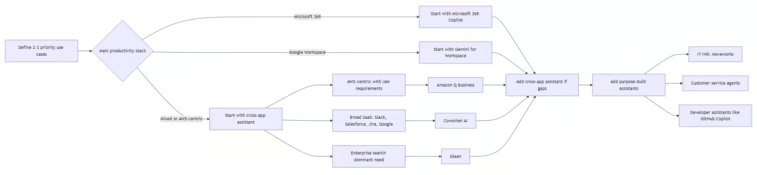
Top platforms at a glance; Best Enterprise AI Assistant Software
Compare table for choose the Best Enterprise AI Assistant Software;
| Platform | Best fit for large teams | Primary strengths | Typical pricing (public) |
|---|---|---|---|
| Microsoft 365 Copilot | Microsoft 365-first orgs | Deep integration in Word/Excel/Teams/Outlook/SharePoint; permission-aware via Microsoft Graph; enterprise data protection commitments and admin controls. | ~$30/user/month add-on on M365. |
| Google Gemini for Workspace | Google Workspace-first orgs | In-app AI in Gmail/Docs/Sheets/Meet/Drive; large context and multimodal; enterprise-grade admin and security. | ~$20/user/month add-on (varies by plan). |
| Amazon Q Business | AWS-centric and regulated environments | 40+ data-source connectors; respects IAM permissions; admin topic filters; Q Apps for lightweight workflow apps and actions (50+ actions out of the box); Q Quick for agentic teammates. | $20/user/month (Pro). |
| Coworker AI | Mixed SaaS stacks (Slack + Salesforce + Jira + Google/Microsoft) | Organizational memory across tools; executes follow‑through actions (SFDC updates, Jira tickets, Slack posts); agent builder; SOC 2; 40+ connectors. | $30/user/month (flat). |
| Glean | Very large, app-diverse enterprises; search-first use cases | Knowledge graph with 100+ connectors; best-in-class semantic search and retrieval; AI agent builder and governance; strong permission-aware search. | Custom (median ~$97.5K/year per Vendr). |
| ChatGPT Business/Enterprise | General reasoning + internal tooling via apps and API | Frontier models (GPT-5) with SAML SSO, admin console, and apps ecosystem; no training on your data by default; SOC 2 and support for DPAs; strong for coding/analysis. | Business: transparent; Enterprise: typically ~$40–60/user/month (custom). |
| Claude for Enterprise (Anthropic) | Legal/compliance, research, code with long docs | Very large context (200K tokens); strong safety focus; enterprise privacy commitments. | Custom enterprise pricing. |
| Zoom AI Companion | Meeting- and video-heavy organizations; cross-platform meeting notes | Meeting summaries and smart recordings across Zoom, Google Meet, Microsoft Teams (via calendar integration); web panel with connectors to Google Drive/OneDrive; admin toggles at account/group/user levels; no training on customer content; optional Zoom-only or Zoom + Anthropic (ZM+) models. | Included in eligible Zoom accounts; add-ons for Custom AI Companion and ZM+ models are extra. |
| Moveworks | Large enterprises prioritizing IT and HR service automation | Purpose-built for IT/HR ticket and knowledge automation; strong NLU for service requests; broad integrations. | Custom (typically $100K+/year for large deployments). |
What “enterprise AI assistant” means in 2026
Best Enterprise AI Assistant Software; Purpose‑built enterprise AI assistants differ from consumer tools in five key ways: company‑grounded answers, permission‑aware access, enterprise security, admin controls, and workflow execution.
Consumer AI can help with general tasks, but enterprise assistants must work with your actual data, respect your access controls, and fit your governance model.
Deep dive on top options for Best Enterprise AI Assistant Software
The following 10 Best Enterprise AI Assistant Software explore below are;
1) Microsoft 365 Copilot
- Why it matters for large teams:
- Embeds in Word, Excel, PowerPoint, Outlook, Teams, and SharePoint with a shared security and permissions model.
- Uses Microsoft Graph to respect each user’s existing access controls and sensitivity labels; inherits retention policies and supports auditing.
- Enterprise Data Protection (EDP) commits to: encryption at rest and in transit, data isolation between tenants, GDPR/EU Data Boundary/ISO 27018 support, and not using your prompts/responses/Graph data to train foundation models.
- Enables workflow triggers via Power Automate and can be extended with Copilot Studio for custom bots and agents.
- Caveats:
- Limited reach into non-Microsoft tools unless you build integrations.
- Cost stacks on top of existing M365 licenses ($30/user/month).
- Governance and adoption still require planning (policy, training, content hygiene).
2) Google Gemini for Workspace
- Why it matters for large teams:
- Integrated into Gmail, Docs, Sheets, Meet, Drive, and other Workspace apps with enterprise controls via the Admin console.
- Strong for content creation, collaboration, and analysis within Google’s ecosystem.
- Typically priced as a lower add‑on (~$20/user/month) compared to Copilot, depending on plan.
- Caveats:
- Less natural choice for Microsoft-heavy environments.
- For deep cross‑app actions, you may still need a dedicated assistant (e.g., Glean or Coworker) or custom extensions.
3) Amazon Q Business
- Why it matters for large teams:
- Connects to 40+ data sources including S3, SharePoint, Salesforce, Slack, and Jira; unifies structured (databases/warehouses) and unstructured data.
- Respects existing identities, roles, and permissions (especially AWS IAM), making it attractive for AWS‑centric organizations.
- Provides over 50 ready‑to‑use actions across Jira, Salesforce, PagerDuty, ServiceNow, etc., enabling users to execute tasks from Q Business chat.
- Q Apps lets users create and share lightweight AI-driven apps to automate workflows (e.g., draft emails from notes and update CRM records).
- Admin controls include topic filters, keyword blocking, and centralized management; offers “Zero Data Retention” options for third‑party model providers.
- Caveats:
- Best ROI if you are already on AWS or OK with a vendor‑agnostic approach; otherwise, it may feel like another stack to operate.
- Pricing is per‑user and usage‑based in some modes; you’ll want to model costs carefully at scale.
4) Coworker AI
- Why it matters for large teams:
- Designed for mixed SaaS stacks: Slack, Salesforce, Jira, Google Workspace, and more. Organizational memory (OM1) builds a coherent knowledge graph across tools.
- Not just search: it can execute follow‑through actions like updating Salesforce, creating Jira tickets, drafting emails, and posting to Slack, which is powerful for revenue ops, CS, and operations workflows.
- Flat per‑user pricing ($30/user/month) and a 48‑hour POC; SOC 2 Type 2 compliance; agent builder for internal workflows.
- Caveats:
- No mobile app yet.
- Historical data is limited to a 90‑day lookback from the time of data source connection.
5) Glean
- Why it matters for large teams:
- Knowledge graph across 100+ applications with permission-aware retrieval; strong for “who owns X and what’s the status?” type queries across Salesforce, email, Slack, docs, etc.
- Rich assistant capabilities including agents and deep research, with governance controls and connectors to major SaaS platforms.
- Caveats:
- Pricing is premium; median spend is high (≈$97.5K/year per one source), especially attractive at very large scale.
- Strong on search and knowledge; workflow execution is present but historically secondary (growing with new agent capabilities).
6) ChatGPT Business & Enterprise (OpenAI)
- Why it matters for large teams:
- Business tier offers a shared workspace, admin console, SAML SSO, and 60+ apps to connect to tools like Slack, Google Drive, SharePoint, GitHub, and Atlassian—giving company‑grounded answers when connected.
- Enterprise/Business commitments: by default, no training on your business data; you own inputs and outputs where allowed by law; AES‑256 encryption at rest and TLS 1.2+ in transit; SOC 2 Type 2 certified; DPAs available for GDPR/CCPA.
- Custom GPTs and APIs let you build specialized internal assistants and integrate into your own products and workflows.
- Caveats:
- Without connectors and engineering, it’s not a “plug‑and‑play” assistant tied to your live SaaS data (compared to Glean/Coworker/Amazon Q).
- You’ll still need a clear governance policy: which tools to connect, data handling, and prompt hygiene.
7) Claude for Enterprise (Anthropic)
- Why it matters for large teams:
- Very large context window (200K tokens) excels for long contracts, research papers, and large codebases.
- Safety-oriented “Constitutional AI” approach and enterprise privacy controls make it appealing for regulated industries (legal, compliance, research).
- Caveats:
- Primarily a standalone assistant; you must supply documents or use integrations you build to ground it in your data.
8) Zoom AI Companion
- Why it matters for large teams:
- Provides meeting summaries, smart recordings, in‑meeting questions, and “AI Companion on the web” for deep research, writing, and personal workflows.
- Can attend third‑platform meetings (Google Meet, Microsoft Teams) when calendar is connected to provide summaries across meeting tools.
- Admin controls: enable/disable at account/group/user levels; manage connectors to Google Drive/OneDrive/Google Calendar/Outlook; optional ZMO (Zoom‑hosted only) or ZM+ (Zoom + Anthropic via Amazon Bedrock) deployment options. Zoom does not use customer content to train Zoom or its third‑party models, and has “Zero Data Retention” policies with third‑party model providers for most AI Companion features.
- Caveats:
- While powerful for meetings, it may not cover broader SaaS workflows without combining with other assistants.
- Cross‑platform transcription and calendar integrations require careful configuration and change management.
9) Moveworks (IT/HR service automation)
- Why it matters for large teams:
- Purpose‑built for IT and HR service desks; automates ticket resolution, password resets, policy questions, and employee service requests at scale.
- Strong NLU and deep integrations into ServiceNow, HR systems, and identity providers, enabling significant reduction in L1/L2 ticket volume.
- Caveats:
- Focused on IT/HR use cases; not a general assistant for sales, marketing, or operations.
- Pricing typically starts around six‑figures for large enterprises, so ROI is tied to deflected headcount in service centers.
10) Customer‑facing conversational AI platforms
- When you need external agents for support, sales, or operations, platforms like Google’s Vertex AI agenting, Cognigy, Kore.ai, LivePerson, Sprinklr, Yellow.ai, and others are recognized by Gartner’s 2025 Magic Quadrant for Conversational AI Platforms.
- These platforms specialize in:
- Multi‑channel deployments (web, mobile, WhatsApp, voice).
- Orchestration, human handoff, and compliance tools (verifications, encryption, reporting).
- Enterprise‑grade admin consoles, versioning, and analytics for large contact centers.
Now you may how to choose Best Enterprise AI Assistant Software for your needs.
Decision framework for large teams
Best Enterprise AI Assistant Software; Explore the Decision framework for large teams
1) Start with use cases, not vendors
- Pick 2–3 high‑value, measurable use cases, for example:
- Knowledge: “Find info across 100+ apps and get cited answers.”
- Meetings: “Auto‑summarize all internal and external meetings and push follow‑ups.”
- Revenue ops: “Update CRM from meeting notes and enrich account plans.”
- Service desk: “Deflect 30–40% of L1 tickets for IT and HR.”
- Map each use case to data sources and required actions.
2) Choose your primary “productivity” assistant
- Microsoft‑first:
- Start with Microsoft 365 Copilot and layer in a cross‑app assistant (Coworker, Amazon Q, or Glean) when you need deeper Slack/Salesforce/Jira reach or cross‑platform workflows.
- Google‑first:
- Start with Gemini for Workspace, then add a cross‑app assistant for knowledge and actions.
- AWS‑centric or highly regulated:
- Consider Amazon Q Business as your primary assistant because of IAM integration and Q Apps for workflows, and supplement with other assistants as needed.
3) Add a cross‑app knowledge and execution layer
- For teams heavily using Slack, Jira, Salesforce, and Google/Microsoft tools together, Coworker and Glean are strong candidates:
- Coworker emphasizes execution and organizational memory across 40+ tools with a transparent $30/user/month price.
- Glean excels at enterprise search and knowledge graph at scale, with 100+ connectors and agent governance, but pricing is typically custom and higher.
- If your priority is tightly coupling AI with AWS services and IAM, Amazon Q Business is compelling at $20/user/month and strong extensibility via Q Apps and actions.
4) Add purpose‑built assistants where ROI is clear
- IT/HR: Moveworks or equivalent to reduce ticket volume and improve employee experience.
- Customer support: conversational AI platforms (Google, Cognigy, Kore.ai, LivePerson, etc.) to deploy IVR/chatbots across channels.
- Developer productivity: GitHub Copilot for coding assistance within IDEs and pull requests.
5) Evaluate data grounding, permissions, and security
- Critical questions:
- Will this assistant see each user only what they’re already allowed to see?
- Can I enforce sensitivity labels and data loss prevention (DLP) policies?
- Is there a clear no‑training‑on‑your‑data commitment and, where applicable, zero‑data retention with third‑party model providers? Best Enterprise AI Assistant Software (Microsoft, OpenAI, Zoom, Amazon, Anthropic all provide such commitments in their enterprise offerings.)
- Concrete evidence to ask for:
- Documentation on how permissions are inherited (e.g., Microsoft Graph, IAM, OAuth scopes).
- Independent certifications (SOC 2 Type 2, ISO 27001, FedRAMP) and a downloadable DPA.
- Options for regional data processing (EU Data Boundary, data residency, customer‑managed keys).
6) Admin controls, governance, and change management
- Require:
- Role-based access control and SAML SSO; ability to provision/deprovision via SCIM.
- Usage analytics and dashboards (by department/user, prompts, features).
- Feature toggles and topic filters to roll out gradually and restrict sensitive topics (e.g., M&A, compensation).
- Plan for:
- Prompt libraries and “golden prompts” for common tasks.
- Data classification and content hygiene before broad deployment.
- Ongoing training and comms to manage expectations (accuracy, acceptable use).
7) Pilot and metrics
- Design a 4–8 week pilot with a representative slice of users.
- Track leading indicators:
- Weekly/daily active users; adoption by department.
- Tasks completed (e.g., tickets resolved, CRM updates, queries answered).
- Track lagging outcomes:
- Ticket deflection rates; time saved in meetings or content work.
- Revenue cycle metrics (sales cycle length, win rate) if workflows are in the revenue path.
Scenarios and starting points
- Scenario A: Global enterprise, Microsoft 365 + Salesforce + Slack + Jira
- Primary assistant: Microsoft 365 Copilot for Office productivity.
- Cross‑app layer: Coworker AI for cross‑stack workflows and actions; Glean as an alternative if search/knowledge is the dominant need.
- Add ChatGPT/Enterprise or Claude as needed for specialized reasoning or custom tools.
- Scenario B: Tech company on Google Workspace + GitHub + Slack + AWS
- Primary assistant: Gemini for Workspace.
- Cross‑app layer: Amazon Q Business if AWS is central; otherwise Coworker or Glean for Slack/GitHub/Salesforce coverage.
- Developer assistants: GitHub Copilot for coding.
- Optional: ChatGPT/Enterprise with GitHub apps for code-specific workflows.
- Scenario C: Regulated industry (financial services/healthcare), strict data residency and compliance
- Favor offerings with strong compliance (e.g., Microsoft EDP, OpenAI DPA and SOC 2, Zoom’s zero data retention and customer‑managed keys, Amazon Q with FedRAMP and IAM).
- Start with productivity suite‑native assistant (Copilot or Gemini) scoped to compliant workloads.
- Add customer‑service conversational AI platforms with strong governance for external bots.
- Use Moveworks or similar to reduce IT/HR ticket burden under strict access controls.
- Scenario D: Highly distributed org with many SaaS tools and fragmented knowledge
- Prioritize a knowledge‑first assistant like Glean or Coworker that can index 100+ apps and provide cited, permission‑aware answers.
- Layer in Zoom AI Companion if meetings are a primary knowledge repository.
- Consider ChatGPT/Enterprise or Claude for heavy research and long‑document analysis.
Practical procurement checklist
- Security & compliance:
- No training on your data by default (and third‑party zero data retention where applicable).
- Encryption at rest and in transit; customer‑managed keys available.
- Certifications (SOC 2, ISO 27001, FedRAMP) and data residency options.
- Data & permissions:
- Permission‑aware retrieval and actions; inherits existing IAM/Graph/OAuth scopes.
- Support for sensitivity labels and DLP where possible.
- Admin & governance:
- Centralized admin console with SSO/SCIM; role‑based controls.
- Usage analytics and audit logs.
- Feature and topic filters for phased rollout and risk mitigation.
- Extensibility:
- Connector breadth for your critical apps (CRM, ticketing, code repos, drive storage).
- Agent builders or workflow automation (Q Apps, Coworker agents, Glean agents, Zoom AI Studio, Copilot Studio).
- Total cost and scalability:
- Transparent per‑user pricing vs. custom enterprise quotes.
- Ability to start with a pilot and scale without massive re‑architecture.
- Vendor viability and roadmap:
- Momentum in the market (e.g., inclusion in analyst reports like Gartner’s Magic Quadrant for Conversational AI Platforms for agenting vendors).
- Clear roadmap on agentic capabilities, data connectors, and governance.
Best Enterprise AI Assistant Software; If you share your primary stack, your most critical use cases, and your risk/compliance profile, I can map this framework to a shortlist and a phased rollout plan tailored to your organization.






Leave a Reply