
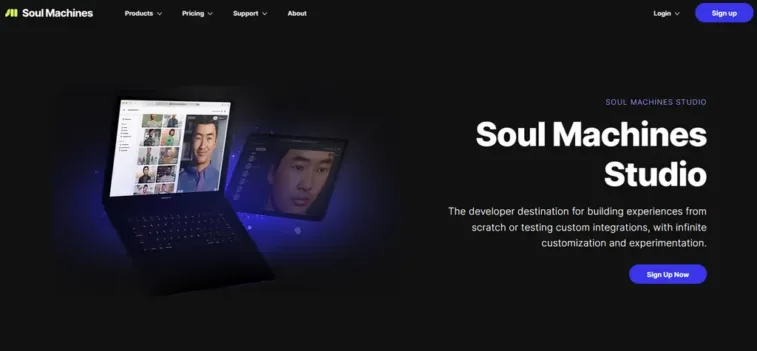
Create & deploy emotionally intelligent Humanize AI assistants with Soul Machines Studio AI Agent. Design your own lifelike Digital People to deliver hyper-personalized experiences. Learn more.
Revolutionizing Interactions: A Deep Dive into Soul Machines Studio AI Humanize Agents 🤖
In the rapidly advancing domain of artificial intelligence, where authentic human connections are increasingly valued in digital spaces, Soul Machines Studio Humanize AI Agent stands out as a pioneering platform for crafting lifelike digital entities. This innovative tool empowers creators, developers, and enterprises to build autonomous AI agents that exhibit genuine emotional responses, fostering trust and engagement in applications ranging from customer service to educational simulations.
Developed by Soul Machines, a leader in Experiential AI™, the Studio leverages biological-inspired technology to humanize AI, making interactions feel natural and empathetic. As of late 2025, it has evolved from a niche prototype into a versatile ecosystem, enabling no-code deployments and custom integrations that redefine how businesses and individuals leverage AI for meaningful, scalable conversations. By blending neuroscience with generative models, Soul Machines Studio transforms static chatbots into dynamic digital workers, addressing the growing need for AI that not only responds but truly connects in an era of hybrid human-machine collaboration.
Overview: Crafting Empathetic Digital Companions 🏗️
Soul Machines Studio Humanize AI Agent is a self-service platform that democratizes the creation of hyper-realistic, emotionally intelligent AI agents. At its core, it utilizes Experiential AI™—a proprietary blend of computer vision, natural language processing, and affective computing—to generate agents capable of nuanced facial expressions, body language, and contextual empathy. Users start by defining agent personas through intuitive tools, then deploy them across web, mobile, or enterprise systems for tasks like virtual assistance or interactive storytelling.
This agentic framework is LLM-agnostic, allowing integration with models like GPT or Claude for tailored dialogues. Unlike conventional AI builders, Soul Machines emphasizes biological fidelity, drawing from human physiology to simulate realistic emotions, which enhances user immersion and outcomes in sectors such as healthcare, retail, and finance. With a focus on ethical AI, the Studio includes bias mitigation and consent protocols, ensuring deployments are responsible and inclusive.
Key Features: Tools for Lifelike AI Orchestration 🔧
Soul Machines Studio packs a robust array of features that blend creativity with technical prowess, enabling end-to-end agent development:
- Customizable Agent Design 🎨: Users craft unique personas with adjustable appearances, voices, and behaviors, incorporating emotional intelligence for authentic reactions like smiles or nods during conversations.
- LLM-Agnostic Integration 🔗: Seamlessly connect to preferred language models, ensuring flexibility in dialogue generation while maintaining high-fidelity emotional responses.
- No-Code Workflow Automation ⚙️: Drag-and-drop interfaces for building interactions, with pre-built templates for quick setups in customer support or training scenarios.
- Experiential AI™ Engine 🌟: Patented technology simulates human-like emotions and autonomy, allowing agents to adapt in real-time to user cues for more engaging exchanges.
- Deployment and Scaling Options 🚀: Support for live deployments across platforms, with analytics to monitor engagement and refine performance.
- Security and Compliance Suite 🛡️: End-to-end encryption, custom data controls, and integration with tools like ServiceNow or Zapier for enterprise-grade operations.
These capabilities make the Studio a comprehensive hub for turning conceptual AI ideas into deployable, human-centered solutions.
Pros: Elevating AI with Human Touch 📈
Soul Machines Studio Humanize AI Agent offers compelling advantages that set it apart in the crowded AI landscape:
- Unparalleled Empathy and Engagement 😊: Agents’ lifelike emotions build deeper connections, leading to higher user satisfaction and retention in interactive applications.
- Scalability Without Complexity 🚀: From free exploration to enterprise licensing, it supports growth seamlessly, with no-code options reducing development time by up to 70%.
- Ethical and Inclusive Design 🌍: Bias detection and diverse persona options promote responsible AI, aligning with global standards for fairness.
- Versatile Applications 💼: Excels in varied use cases, from virtual therapy to sales demos, delivering measurable efficiencies like reduced response times.
- Innovation-Driven Support 🌟: Regular updates and community resources keep users at the forefront of Experiential AI advancements.
These strengths make it an ideal choice for forward-thinking organizations.
Cons: Challenges in Accessibility and Customization ⚠️
While powerful, Soul Machines Studio Humanize AI Agent has some drawbacks to consider:
- Steep Pricing for Advanced Use 💸: Higher tiers can be costly for small teams, limiting access for startups or individual creators.
- Learning Curve for Novices 📈: Despite no-code elements, mastering emotional tuning requires familiarity with AI concepts.
- Dependency on Integrations 🔌: Optimal performance relies on external LLMs, potentially introducing variable costs or compatibility issues.
- Limited Free Features 🆓: The entry-level plan restricts interactive minutes, pushing users toward paid upgrades for full functionality.
- Resource Intensity 🖥️: High-fidelity rendering demands robust hardware or cloud resources, which may not suit low-end setups.
These factors suggest it’s best for users with dedicated AI budgets.
Prices: Tiered Plans for Progressive Adoption 💰
Soul Machines Studio offers a subscription-based model focused on annual commitments, with a 14-day free trial for paid plans. As of October 2025, the structure includes:
- Free Plan ($0/year): Exploration-only access to creation tools; no live deployments or interactive minutes—ideal for testing concepts.
- Basic Plan ($140/year): 480 interactive minutes, 1 live deployment, community support—suited for experimentation.
- Plus Plan ($1,069/year): 4,200 interactive minutes, 3 deployments, custom LLM integration—targeted at validation stages.
- Pro Plan ($29,160/year): 120,000 interactive minutes, 6 deployments, email support—optimized for scaling.
- Pro + Premium Plan ($34,160/year): Adds workflow integrations like Zapier; same minutes as Pro—for advanced enterprise needs.
Enterprise solutions like Workforce Connect start at $40,000/year for no-code integrations, while AWS licenses begin at $100,000/year for custom volumes. Additional fees may apply for bespoke features.
Alternatives: Comparable Platforms for Humanized AI Agents 🔄
For those exploring options, several alternatives provide similar capabilities in creating empathetic AI entities, though with varying emphases:
- Synthesia: Focuses on AI video avatars for presentations; excels in script-to-video but less autonomous—starting at $22/month.
- HeyGen: Emphasizes customizable talking heads with emotional tones; strong for marketing yet limited in full-body agents—$24/month pro.
- UneeQ: Offers digital human platforms for customer service; robust empathy simulation but higher enterprise pricing—custom quotes from $5,000/month.
- Replika: Prioritizes companion AI with emotional depth; affordable for personal use but narrower in business applications—$7.99/month premium.
- D-ID: Specializes in animating photos into speakers; quick for prototypes but trails in interactivity—freemium with $5.99/month starter.
These platforms offer pathways for specialization, balancing Soul Machines’ Experiential AI with cost or ease-of-use priorities.
Step-by-Step Guide: Creating Humanized AI Agents at Soul Machines Studio AI
Soul Machines Studio AI specializes in creating Digital People—hyper-realistic AI agents that combine conversational AI with emotionally responsive avatars. Here’s a comprehensive guide to building and humanizing your AI agent.
Phase 1: Setup & Foundation (5-10 minutes)
Step 1: Sign Up & Choose Your Plan
- Visit Soul Machines and sign up for a 14-day free trial of Studio Pro, or start with the free forever plan
- Studio Pro ($395/month) unlocks custom LLM integration, analytics, and premium avatars
- Enterprise is required for Workforce Connect integrations (ServiceNow, Zapier)
Step 2: Select Your Starting Point
You have two options:
A) Preset Project Templates (Recommended for beginners)
- Digital Greeter: For front-desk, welcome experiences
- Solution Expert: For technical support and product demos
- Conversation Coach: For training and soft skills development
- Influencer: For brand ambassadors and social media
B) Build from Scratch
- Create a completely custom Digital Person for specialized use cases
Pro Tip: Click Preview on any template to interact with it live before committing.
Phase 2: Avatar Creation & Customization (30-45 minutes)
Step 3: Choose & Customize Your Digital Person Avatar
Select Avatar Base:
- Browse the HumanOS 2.6 library of photorealistic digital humans
- Each avatar has unique facial features, ethnicity, age, and style options
Advanced Customization with Digital DNA:
- Click the 3 dots on any avatar → “Collect Digital DNA”
- This copies a unique encoded string representing that avatar’s genetic blend
- Paste the DNA into a text editor, then use the Digital DNA Blender to:
- Modify facial features, skin tone, hair style
- Adjust eye color, facial structure, expressions
- Create a truly unique Digital Person
Important: Digital DNA feature is only available for avatars created from the Blender.
Step 4: Define Appearance & Styling
- Clothing: Choose professional attire (suit, lab coat, casual) matching your brand
- Setting: Select background environment (office, studio, virtual space)
- Camera Angles: Configure close-up, medium, or wide shots for different interaction types
Phase 3: Humanizing the “Brain” (60-90 minutes)
Step 5: Connect Your LLM (Large Language Model)
This is where you separate personality (Soul Machines) from knowledge (your LLM).
For Studio Pro/Enterprise Users:
- Navigate to “Configure Brain” settings
- Choose your LLM provider:
- OpenAI GPT-4o (most popular for reasoning)
- Anthropic Claude (for safety-conscious applications)
- Custom endpoint (bring your own fine-tuned model)
- Input your API key from your chosen provider
- Set temperature (0.3 for factual, 0.7 for creative) and max tokens
For Free Users: Use Soul Machines’ default NLU engine with limited customization.
Step 6: Build Knowledge Base & Skills
Upload Domain Knowledge:
- Documents: Upload PDFs, Word docs, product manuals
- FAQ Sets: Create structured Q&A for common inquiries
- Website Crawling: Point to your knowledge base URL for automatic ingestion
- API Connections: Link to CRM, ticketing systems, or databases
Define Skills:
- Conversational Skills: Greeting, small talk, empathy statements
- Task-Specific Skills: Appointment booking, product recommendation, troubleshooting
- Escalation Rules: When to transfer to human agents based on sentiment or query complexity
Step 7: Script Human-Like Conversation Flows
Create Persona-Specific Scripts:
- Greeting: “Hi, I’m [Name]. How can I help you today?” (warm, open-ended)
- Empathy Statements: “I understand that can be frustrating” (for healthcare/insurance)
- Clarifying Questions: “Can you tell me more about…” (active listening)
- Closing: “Is there anything else I can help you with?” (complete the loop)
Use Gesture Markup Language:
- Insert behavior tags in your script:
[smile],[nod],[concerned] - Example: “I’m sorry to hear that
[concerned]let me help you resolve this.”
Phase 4: Humanizing Behavior & Emotions (45-60 minutes)
Step 8: Configure Behavior Styles & Emotions
Choose Behavior Style:
- Friendly: Casual, upbeat, frequent smiling
- Poised: Professional, measured, calm expressions
- Energetic: Animated, expressive, dynamic gestures
- Compassionate: Soft tone, concerned expressions, slow speech
Adjust Behavioral Settings:
- Gesture Frequency: How often the avatar nods, gestures
- Emotional Responsiveness: Sensitivity to user facial expressions (if using webcam)
- Speech Pace: Words per minute (120-150 WPM is natural)
- Pause Duration: Natural breathing pauses between sentences
Step 9: Enable Facial Expression Recognition & Adaptation
Activate “Perception” Features:
- Enable webcam-based facial expression analysis (optional, user must consent)
- Configure adaptive responses:
- Detects confusion (furrowed brow) → Simplify language, offer examples
- Detects frustration (frown, tense jaw) → Soften tone, apologize, escalate
- Detects happiness (smile) → Mirror positivity, proceed with confidence
Implementation: Use Soul Machines’ Digital Brain settings to map emotions to responses.
Phase 5: Testing & Refinement (30-45 minutes)
Step 10: Preview & Iterate
Use the Live Preview Pane:
- Update Preview after every change to see real-time behavior
- Test Script Box: Type custom phrases to test voice, gestures, and emotional responses
- Simulate Conversations: Run through 10-15 common user scenarios
- Check for Naturalness: Does speech sound robotic? Adjust pacing and pauses
Test Different Scenarios:
- Happy customer inquiry
- Frustrated complaint
- Technical troubleshooting
- Ambiguous questions
Step 11: Fine-Tune Based on Feedback
Internal Testing:
- Have 5-10 team members interact with the agent
- Collect feedback on: realism, helpfulness, empathy, accuracy
- Identify failure points where agent should escalate to human
Adjust Parameters:
- If too stiff: Increase gesture frequency, lower speech pace
- If too casual: Choose “Poised” behavior style, reduce filler words
- If inaccurate: Refine knowledge base, adjust LLM temperature down
Phase 6: Deployment (15-30 minutes)
Step 12: Deploy Your Digital Person
Generate Deployment Links:
- Click “Deploy” in Studio
- Soul Machines creates a unique URL:
https://[your-project].soulmachines.cloud - Choose deployment type:
- Web SDK: Embed on your website
- iFrame: Simple webpage integration
- API: For mobile apps or custom platforms
Embed on Website (Web SDK):
JavaScript
// Add to your HTML
<script src="https://web.soulmachines.com/v1/soulmachines.js"></script>
<script>
  SoulMachines.createAgent({
    apiKey: 'YOUR_API_KEY',
    projectId: 'YOUR_PROJECT_ID',
    container: document.getElementById('sm-container')
  });
</script>
Step 13: Configure Channel Integrations (Optional)
For Enterprise Users:
- ServiceNow: Deploy agents directly in ITSM workflows
- Zapier: Connect to 7,000+ apps for automation
- Discord/Slack: Embed for internal team support
- ElevenLabs: Upgrade to ultra-realistic AI voices
Phase 7: Monitor & Optimize (Ongoing)
Step 14: Track Performance & Humanize Further
Monitor Analytics:
- Conversation Volume: How many interactions per day
- Sentiment Analysis: User emotional state over time
- Resolution Rate: % of queries resolved without human escalation
- Engagement Duration: Average conversation length
Continuous Improvement:
- Weekly: Review conversation logs, identify confusing responses
- Monthly: Update knowledge base with new information
- Quarterly: Refresh scripts based on seasonal trends or product changes
🎓 Pro Tips for Maximum Humanization
1. Use Memory & Personalization
Enable context persistence so the agent remembers user preferences across sessions. Example: “Welcome back, Sarah. Last time we discussed your claim #1234. How can I help today?”
2. Implement Graceful Escalation
Always provide an “Speak to a human” option when frustration is detected or query complexity exceeds threshold.
3. Add Non-Verbal Cues
Configure micro-expressions: slight head tilts for curiosity, eyebrow raises for surprise, subtle blinking for naturalness.
4. Match Industry-Specific Personas
- Healthcare: Compassionate behavior, slower speech, medical jargon with explanations
- Finance: Poised, confident, compliance-aware language
- Education: Energetic, encouraging, adaptive explanations based on confusion detection
5. Test Across Demographics
Ensure your avatar’s appearance and behavior resonate with target audiences in different countries and cultures.
⚠️ Common Pitfalls to Avoid
- ❌ Over-Automation: Don’t remove human touch entirely. Use AI for scale, humans for empathy
- ❌ Ignoring Privacy: Always disclose webcam usage and get explicit consent for facial analysis
- ❌ Static Scripts: Update content regularly to avoid outdated information
- ❌ One-Size-Fits-All: Create different agents for different use cases rather than forcing one agent to do everything
💰 Pricing Summary
| Plan | Monthly Cost | Key Features |
|---|---|---|
| Free | $0 | Basic avatars, limited conversations, no custom LLM |
| Studio | $395 | Custom avatars, LLM integration, analytics, Web SDK |
| Pro + Premium | $2,847 | All features + ServiceNow, Zapier, ElevenLabs integrations |
By following this guide, you can create AI agents that don’t just respond—they connect emotionally, adapt intelligently, and deliver human-like experiences at scale. The key is continuous iteration based on real user interactions and feedback.