
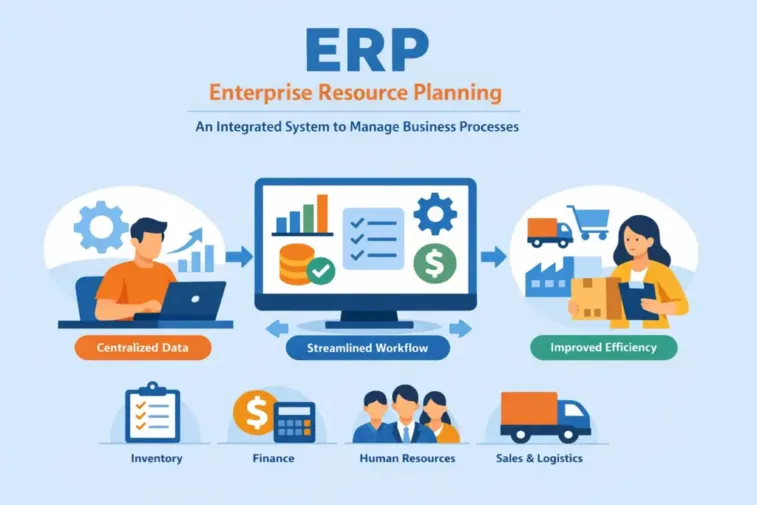
ERP Meaning and Definition; Streamline business operations with ERP systems. Learn what ERP is, how it works & its benefits in our definitive guide. Unlock efficiency & growth now.
2026 Complete Guide: ERP Meaning and Definition
Discover what ERP Meaning and Definition (Enterprise Resource Planning) is and how its integrated systems can streamline your business processes and boost efficiency.
Here’s a clear, complete 2026 guide to ERP Meaning and Definition: what it means, how it works, why it matters, and where it’s going.
Main takeaway (simple definition)
- ERP stands for Enterprise Resource Planning.
- In practice, ERP is integrated software that helps organizations manage and automate core business processes—finance, HR, manufacturing, supply chain, sales, and more—using a single, connected system and a common data source.
Watch the Video make better understand, ERP System?
1. What is ERP? Core definition
- ERP (Enterprise Resource Planning):
- A type of software system that integrates key business functions and processes into one platform to manage day‑to‑day operations and resources.
- Key ideas:
- “Enterprise”: the whole organization, not just one department.
- “Resource”: money, people, materials, time, capacity, and other assets.
- “Planning”: coordinating and optimizing how those resources are used.
ERP Meaning and Definition; Authoritative definitions say essentially the same thing: ERP manages core operations like accounting, resource management, manufacturing, supply chain, HR, and more via a unified system.
2. How ERP works (in plain language)
ERP Meaning and Definition; Think of ERP as a central digital nervous system for a business:
- Data is entered once (e.g., customer order, supplier invoice, employee hours).
- That data is stored in a single, shared database.
- All relevant modules and processes use that same data:
- Sales triggers inventory and production updates.
- Inventory updates affect finance and purchasing.
- Time and attendance data feed payroll and project costing.
Instead of separate spreadsheets and disconnected apps, ERP ties everything together so different departments see the same, up‑to‑date information.
3. Key components and modules of an ERP system
ERP Meaning and Definition; Most ERPs are modular. You can implement the core modules and add others over time. Common components include:
- Finance and Accounting
- General ledger, accounts payable/receivable, fixed assets, financial reporting, budgeting, and often multi‑currency and multi‑entity consolidation.
- Human Resources (HR)
- Employee records, payroll, benefits, time and attendance, talent management, and sometimes performance and learning.
- Supply Chain Management (SCM)
- Procurement, supplier management, purchasing, inventory, warehousing, and logistics.
- Manufacturing / Operations
- Production planning, bill of materials, routing, shop floor control, quality management, and maintenance.
- Customer Relationship Management (CRM) / Sales
- Lead and opportunity management, quotes, orders, pricing, and sometimes customer service and marketing.
- Project Management and Project Accounting
- Project planning, budgeting, resource allocation, time tracking, and profitability analysis (especially in services).
- Analytics and Reporting
- Dashboards, BI, ad‑hoc reporting, KPIs, and sometimes AI‑assisted insights.
Modern ERP suites often add industry‑specific modules (e.g., retail POS, field service, process manufacturing) and front‑office functions like ecommerce and marketing automation.
4. Types of ERP by deployment
ERP Meaning and Definition; Most sources agree on three main deployment types:
- On‑premises ERP
- Software installed and run on the company’s own servers.
- IT manages upgrades, backups, security, and infrastructure.
- Common in highly regulated industries or where data residency is strict.
- Cloud ERP (SaaS)
- Hosted by the vendor on its cloud infrastructure; accessed via web browser.
- Vendor handles infrastructure, updates, security patches, and backups.
- Typically faster to implement and easier to scale.
- Most new ERP selections now favor cloud: one report notes about 78.6% of organizations chose cloud ERP in 2024, up from 65% in 2023.
- Hybrid ERP
- A mix of on‑premises and cloud—e.g., head office on‑premises, subsidiaries on cloud; or some modules in the cloud and sensitive workloads on‑prem.
- Used when companies need to balance control, compliance, and flexibility.
5. What problems does ERP solve?
Without ERP, organizations often struggle with:
- Siloed systems and data:
- Different departments use separate spreadsheets and apps, leading to conflicting data and manual reconciliation.
- Manual processes:
- Lots of copy‑pasting, data entry, and email chains—slow and error‑prone.
- Poor visibility:
- Leadership can’t see a real-time, consolidated view of performance.
- Inefficiency and cost:
- Redundant tasks, excess inventory, missed orders, and expediting costs.
With ERP, benefits typically include:
- Integrated processes:
- Order‑to‑cash, procure‑to‑pay, and hire‑to‑retire flow across modules with less manual hand‑off.
- Better data:
- Single source of truth reduces errors and duplication.
- Efficiency:
- Automation of routine tasks like invoicing, payroll, procurement approvals, and inventory replenishment.
- Visibility and control:
- Dashboards and reports show financials, operations, and KPIs in near real‑time.
- Compliance and risk management:
- Standardized processes, audit trails, and built‑in controls support regulatory compliance and internal controls.
6. How ERP has evolved (brief history)
- 1960s–1970s: Material Requirements Planning (MRP)
- Focused on planning materials and scheduling in manufacturing.
- 1980s: MRP II
- Expanded to include more manufacturing and financial aspects.
- 1990s: ERP
- Scope grew beyond manufacturing to finance, HR, distribution, and other enterprise functions—becoming true “enterprise” systems.
- 2000s–2010s: Extended ERP and early cloud
- Added CRM, supplier portals, ecommerce, and more; cloud options started to appear.
- 2020s: Cloud‑first, intelligent, composable ERP
- Shift to SaaS cloud ERP; integration with AI/ML, analytics, and IoT; move toward composable architectures (best‑of‑suite + best‑of‑breed integration) rather than one monolithic system.
7. ERP in 2026: key trends shaping the future
ERP isn’t static. By 2026, several trends are defining the next generation:
- Cloud ERP is the default for most organizations
- Cloud deployments now dominate new ERP selections; hybrid and multi‑cloud strategies are common to balance performance, security, and integration.
- AI and automation embedded in ERP
- Gartner predicts that cloud ERP applications with embedded AI assistants will enable finance organizations to close the books 30% faster by 2028.
- AI is used for:
- Invoice and expense matching
- Cash flow forecasting
- Demand planning and inventory optimization
- Anomaly detection and risk monitoring
- Composable and modular ERP
- Organizations are moving from monolithic suites to “composable ERP”—flexible combinations of core ERP and specialized apps integrated via APIs and platforms.
- Gartner notes over 70% of organizations are expected to shift from monolithic to composable approaches by 2026.
- Industry‑specific and vertical ERP
- Vendors offer specialized capabilities for manufacturing, distribution, retail, healthcare, construction, etc.
- Gartner’s “cloud ERP for product‑centric enterprises” is one example of vertical‑specific cloud ERP categories.
- Focus on user experience and low‑code / no‑code
- Modern ERPs emphasize simpler, more intuitive UIs and the ability to build or modify processes without heavy custom coding.
- Real‑time analytics and decision support
- ERPs increasingly include embedded BI and AI‑driven insights to support faster, data‑driven decisions across the business.
8. Common examples of ERP systems (for context)
There are many ERP vendors; examples often cited include:
- SAP (e.g., S/4HANA)
- Oracle (Fusion Cloud ERP, NetSuite)
- Microsoft (Dynamics 365)
- Infor
- Sage (Intacct, X3)
- Epicor
- IFS, Acumatica, and others (often strong in manufacturing or mid‑market)
Different vendors specialize by company size (SMB vs. large enterprise), industry, and deployment model (cloud vs. on‑prem).
9. When does a company “need” ERP?
You don’t have to be huge to benefit from ERP, but it typically makes sense when:
- You’ve outgrown spreadsheets and disconnected tools:
- Errors are increasing; reconciling data takes too much time.
- Processes are complex and cross departmental boundaries:
- Orders, inventory, purchasing, and finance need tight coordination.
- You need better visibility and control:
- Management wants timely, accurate reports and KPIs.
- Compliance and audit requirements are tightening:
- You need standardized processes and audit trails.
- You’re scaling or restructuring:
- Adding locations, product lines, or mergers/acquisitions.
10. How ERP projects usually work (at a high level)
ERP implementation is less about “installing software” and more about changing how a company works. Typical phases:
- Vision and strategy
- Define why you need ERP, what problems you’re solving, and how success will be measured.
- Requirements gathering and vendor selection
- Identify functional and technical requirements, evaluate vendors, and choose a solution that fits your industry and scale.
- Design and configuration
- Map your business processes to the ERP, configure the system, and decide on integrations with other tools.
- Data migration
- Clean, transform, and load master data and historical data into the new ERP.
- Testing and training
- Test processes thoroughly; train users at all levels.
- Go‑live and stabilization
- Roll out the system (by waves or big‑bang), support users, and stabilize operations.
- Continuous improvement
- Optimize processes, adopt new features (especially in cloud ERP), and expand usage over time.
Gartner emphasizes that aligning ERP initiatives with clear strategic goals is a top predictor of success; failure is common when ERP is treated as a pure IT project without strong business sponsorship and change management. Also Read, Watch Favours Short Film (2024), the acclaimed new shorts by director Agnes Skonare.
11. Common risks and pitfalls to watch
ERP initiatives can fail or under‑deliver if:
- Objectives aren’t clear:
- “We need ERP” is not a goal; “reduce month‑end close by 30%,” or “improve order‑to‑cash cycle time,” is.
- Leadership and user buy‑in are weak:
- Without executive sponsorship and engaged users, adoption suffers.
- Scope creeps and over‑customization:
- Trying to replicate every old process exactly leads to expensive, complex customizations.
- Data quality is ignored:
- Migrating bad data just creates faster, bigger problems.
- Change management is underestimated:
- Training, communication, and support are critical—people’s daily work changes significantly.
12. How to think about ERP in 2026 (practical guidance)
ERP Meaning and Definition; If you’re trying to understand or evaluate ERP in 2026, keep these principles in mind:
- Start with business outcomes, not features:
- Decide what you want to improve (cash flow, service levels, productivity, compliance), then look for ERP capabilities that support those outcomes.
- Prefer cloud when it fits your risk and regulatory profile:
- Cloud ERP reduces infrastructure burden and accelerates access to new features like AI and analytics.
- Think composable:
- Consider a core ERP for finance/operations, plus integrations to specialized best‑of‑breed tools where needed.
- Plan for AI and automation:
- Evaluate how vendors embed AI and automation in key processes—financial close, forecasting, supply chain planning, and customer service.
- Treat implementation as a business change program:
- Invest in change management, training, and ongoing process improvement—not just technical go‑live.
13. Short recap
- ERP = Enterprise Resource Planning:
- Integrated software that manages core business processes—finance, HR, supply chain, manufacturing, sales, and more—using a single data source and unified workflows.
- Purpose:
- Break down silos, improve efficiency, provide visibility, and support better decisions.
- Today:
- Cloud ERP is mainstream; AI, automation, and composable architectures are shaping the next generation.
- Success:
- Depends less on the software itself and more on clear goals, strong leadership, good data, and effective change management.
ERP Meaning and Definition; If you tell me your role (executive, IT, finance, operations, student) and industry, I can tailor this into a shorter, role‑specific explanation (e.g., “What ERP means for a CFO” or “ERP for a manufacturing manager”).