
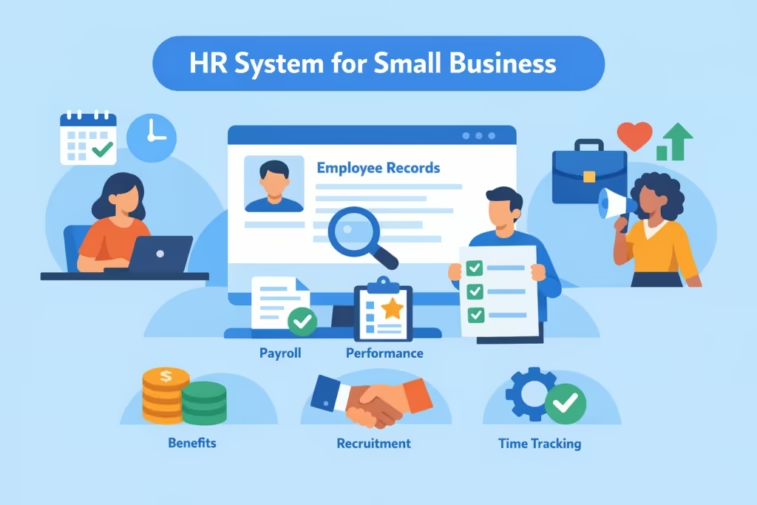
Drowning in spreadsheets & HR headaches? Compare the best HR system for small business in 2026 — cut admin time, stay compliant & find the right fit for your budget.
2026 Complete Guide: 8 Best HR System for Small Business Comparison
Rated by 8,000+ small business owners. Compare the best HR systems for small business in 2026 — affordable, scalable & beginner-friendly picks with honest pros & cons.
📋 Here’s a straightforward, up‑to‑date comparison to help you pick the right HR system for small business in 2026.
Quick recommendations (by scenario)
- Best overall HRIS for most small businesses: BambooHR
- Best if payroll and benefits are your top priority: Gusto
- Best for HR + IT automation (all‑in‑one): Rippling
- Best ultra‑budget pick for very small teams: Zoho People (free tier from $1.50/employee)
- Best for hourly/shift‑heavy teams: Homebase (scheduling + time tracking, free up to 20 users)
- Best for global hiring and EOR needs: Deel
- Best for modular “build‑your‑own” HRIS: Uzio (per Forbes’ 2026 HRIS review)
Quick decision flow
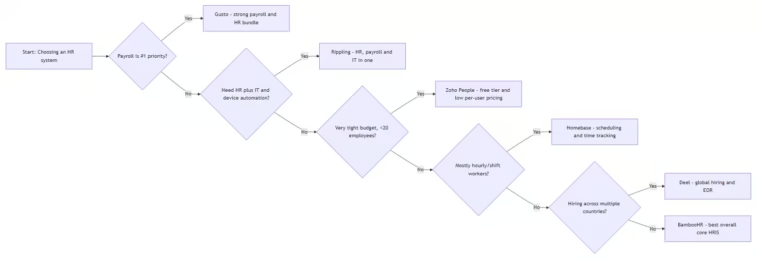
Best HR System for Small Business compared (2026 snapshot)
Best HR System for Small Business; Note: Pricing is approximate and can vary by country, plan, and headcount. Always confirm with the vendor.
| System | Best for | Starting price (monthly) | Notable strengths | Trade‑offs / Gotchas |
|---|---|---|---|---|
| BambooHR | Overall core HRIS for small businesses | ~$10/employee (Forbes); TechnologyAdvice lists ~$10.25/employee for 25+ employees | Easy UI; strong onboarding, self‑service, ATS, and pre‑built HR workflows; deep integrations | Payroll, benefits, time tracking are add‑ons; pricing can climb if you bundle everything |
| Gusto | Payroll‑centric HR; simple and automated for small teams | $49 base + $6/employee (Forbes); Zapier cites “from $49/month” | Excellent full‑service payroll (U.S.), automated tax filing, integrated benefits, plus expanded HR tools on higher tiers; very user‑friendly | HR and time‑tracking features on base plan are limited; customer‑support reviews can be mixed |
| Rippling | HR + IT automation and all‑in‑one workflows | ~$10/employee (Forbes); TechnologyAdvice notes ~$8/employee + $40 base | Deep workflow automation; HR, payroll, IT and finance in one platform; strong global hiring and app integration ecosystem | Can feel “overkill” for very simple needs; pricing/contract terms deserve careful review |
| Zoho People | Affordability and integration with Zoho suite | Free tier (up to 5 users); paid from $1.50/employee | Low per‑user cost; core HR (onboarding, time‑off, document management, reports); AI assistant (Zia); integrates with Zoho Payroll/Recruit | Not an all‑in‑one: payroll and hiring require separate Zoho products; benefits admin not included |
| Homebase | Hourly/shift‑heavy teams (retail, restaurants) | Free up to 20 users; paid plans from ~$30/location (Zapier) | Scheduling, time tracking, and basic payroll bundled; free tier generous for small teams | HR features beyond scheduling/time/payroll are lighter; best used alongside a broader HRIS if you need performance, full employee lifecycle |
| Deel | Global hiring, contractors, and EOR | Free plan available; paid from around $20/month (Zapier) | Strong for remote/global teams, local compliance in 100+ countries, contractor payments and EOR services | Overkill if you only have U.S. employees and don’t need cross‑border hiring |
| Uzio | “Build‑your‑own” HRIS with good automation | $30 + $13/employee (Forbes HRIS list) | Flexible configuration; payroll/HR together; Forbes’ 2026 HRIS review highlights it for AI‑assisted automationforbes | Smaller brand than the giants; verify integrations and support coverage in your region |
| Personio | Time & attendance and HR (UK/Europe‑centric) | ~$5/employee (Forbes) | Strong on time & attendance and core HR workflows; popular for UK‑based mid‑size teams | Fewer global hiring features vs. Deel or Rippling; check regional availability |
How the Best HR System for Small Business – choices stack up by key criteria
- Ease of use
- BambooHR consistently ranks highest for ease of use: Forbes’ testing gave it a 4.9/5 and called it “best HR software for ease of use,” noting intuitive setup for time tracking, time‑off policies and employee lifecycle management.
- Gusto and Zoho People are also praised for user‑friendly UIs and straightforward setup.
- Breadth of HR features (core HRIS)
- BambooHR: strongest overall HRIS coverage for small businesses (recruiting/ATS, onboarding/offboarding, performance, time off, benefits, payroll as add‑ons).
- Rippling: very broad coverage of HR, payroll, IT, and expense management with strong automation.
- Payroll strength
- Gusto: named by Forbes as “best for integrated payroll and HR” and by Zapier as the go‑to for payroll due to automated tax filings and unlimited payrolls.
- Forbes’ dedicated payroll guide also lists Gusto among top choices for small‑business payroll.
- Rippling and Homebase also embed payroll and sync tightly with time tracking.
- Automation and workflows
- Rippling: highlighted by TechnologyAdvice as “best for HR automation”; Rippling’s own content emphasizes workflow/AI automation across HR, IT and finance.
- BambooHR and Zoho People both provide configurable workflows and alerts (e.g., time‑off approvals, performance reminders).
- Budget‑friendly options
- Zoho People: Forbes lists it as “best for affordability” with a free tier and paid from $1.50/employee; Zapier confirms the free plan (up to five users) and $1.50/employee entry pricing.
- Homebase and Connecteam: Forbes’ HR for small businesses guide highlights strong free tiers for time‑clocking/scheduling: Connecteam (free up to 10 users, geofencing) and Homebase (free up to 20 users, with scheduling & time tracking).
- Global hiring / EOR
- Deel: strong option if you need to pay international contractors or hire employees abroad via EOR structures. Forbes and Zapier both position Deel for startups with global hiring needs.
Which system fits common small‑business profiles?
Best HR System for Small Business; You’re 1–10 employees, just getting started, U.S.-only
- If you want the simplest “don’t mess up payroll” choice: Gusto.
- If you want a broader HR foundation from day one (hiring, onboarding, performance, PTO): BambooHR.
- If you’re budget‑sensitive and okay piecing a couple of Zoho apps: Zoho People (core HR) + Zoho Payroll.
You’re 10–50 employees, growing, and want one serious HR platform
- Best all‑around choice: BambooHR.
- If you also want deep IT/identity/device management tied to HR: Rippling.
- If you’re heavily hourly/retail/hospitality with complex scheduling: Homebase (for scheduling/time) + a core HRIS (BambooHR/Zoho People) if needed.
You’re 50–200+ employees and planning for scale
- BambooHR, Rippling, Paycor, and UKG are common recommendations in this band. TechnologyAdvice names Paycor “best for growing businesses” and UKG Ready “best for robust analytics,” though those typically require quotes.
- For multi‑country teams, add Deel or Rippling Global to the mix for cross‑border payroll/EOR.
You’re a distributed/global startup from day one
- For global payroll, EOR, and contractor payments: Deel.
- If you also want heavy IT + finance process automation tied to HR: Rippling.
Practical selection checklist
- Must‑have features (for most small businesses)
- Employee self‑service: view pay slips, tax docs, PTO balances, update basic info.
- Onboarding/offboarding workflows: digital paperwork (I‑9, W‑4 or local equivalents), task checklists.
- Time‑off management and approvals: accruals, balances, approval chains.
- Core reporting: headcount, turnover, basic comp and PTO reports.
- Important “if/else” features
- If payroll in‑house: Look for strong tax filing, direct deposit, garnishments, multiple states/countries (Gusto, Rippling, ADP, Paycor, etc.).
- If you use an external payroll provider: Prioritize HRIS that syncs with it (BambooHR, Zoho People, Personio, etc.).
- If hourly or shift work: Scheduling + time clock integrations or built‑in (Homebase, Connecteam, Deputy, etc.).
- If you hire internationally: EOR/global payroll capabilities (Deel, Rippling Global, Remote).
- If you care about automation across HR/IT/finance: Rippling’s workflow studio and broad app ecosystem.
- Compliance and support
- Does the system stay updated for federal/state (or local) labor rules?
- What help is available during implementation? (Dedicated CSM, chat, phone, knowledge base.)
- Where is data hosted and does it meet your security/privacy requirements?
- Integrations
- Accounting: QuickBooks, Xero, NetSuite, etc.
- Productivity: Slack/Teams, Google Workspace, Microsoft 365.
- Other stack: Your CRM (Salesforce/HubSpot), project tools, and identity providers (Okta, Entra ID).
Approximate cost ranges (rule of thumb)
Best HR System for Small Business; Assuming ~20 employees and U.S. needs (order‑of‑magnitude, not a quote):
- Gusto: base (~$49) + 20 × $6 ≈ $169/month (plus potential add‑ons and higher‑tier HR features).
- BambooHR: at ~$10/employee ≈ $200/month (likely more depending on chosen modules and add‑ons like payroll and time tracking).
- Rippling: at ~$10/employee + $40 base ≈ $240/month (before IT/device costs).
- Zoho People: at $1.50/employee ≈ $30/month; if you add Zoho Payroll, expect additional per‑employee cost.
- Homebase: ~$30/location if you exceed free tier; multi‑location businesses can see costs climb, but time‑tracking/scheduling is integrated.
Red flags to watch out for
- Add‑on pricing surprises: some vendors advertise a low per‑employee rate but charge extra for payroll, benefits, time tracking, or performance modules (common with BambooHR and others).
- Limited customer‑support windows or slow response: user reviews sometimes call out delays, especially during payroll or tax season.
- Multi‑state or multi‑country limitations: entry‑level Gusto payroll, for example, covers one state; additional states can require upgrades or a different provider.
- Over‑engineered for very small teams: full HCM suites like UKG/ADP Workforce Now can be complex and costly for fewer than ~50 employees.
Implementation tips (so you actually go live on time)
- Phase 1 – Define core processes (week 1)
- Map how you handle: hiring, onboarding, time‑off, time tracking, performance, payroll, and offboarding today.
- Identify which of these are “pain points” you must fix first.
- Phase 2 – Shortlist 2–3 vendors (week 2)
- Use the criteria above (must‑haves, integrations, budget) to narrow down.
- Sign up for trials/demos and run 1–2 key scenarios: add a new hire, run a fake payroll, request time off, create a report.
- Phase 3 – Data and setup (weeks 3–4)
- Prepare your employee data export from current systems (spreadsheets, previous software).
- Configure essential policies: PTO accruals, working hours, approval chains.
- Set up integrations (accounting, Slack/Teams, SSO).
- Phase 4 – Employee launch (week 5–6)
- Enable self‑service access and communicate how to use it.
- Run parallel: don’t turn off legacy systems until you’ve completed at least one full payroll/PTO cycle end‑to‑end in the new system.
- Collect feedback and tune workflows (approvals, notifications, reminders).
If you want a tailored shortlist
Best HR System for Small Business; If you share a few details, I can narrow this to 1–2 best fits and estimate cost for your specific case:
- Hard budget ceiling (e.g., <$150/month, $500/month, etc.).
- Country/region of operation and where your employees are.
- Current employee count and 12‑month growth target.
- Must‑haves: payroll included? Benefits admin? Scheduling? Performance reviews?
- Existing tools to integrate with (e.g., QuickBooks Online, Xero, Slack/Teams, G‑Suite/M365).