
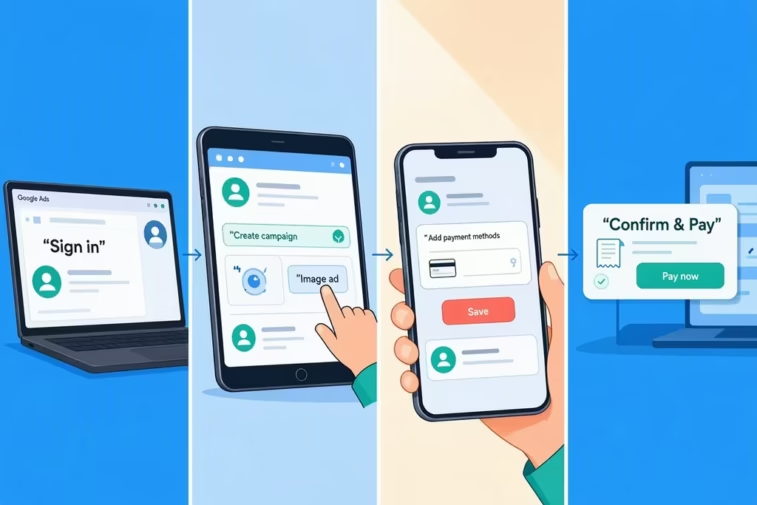
How to pay for ads on Google in 2026: automatic vs manual payments, billing thresholds, monthly invoicing, country options, fixes, and how to cap your bill.
Most people expect paying for Google ads to work like buying something: you pay a set price upfront and get a set result. It doesn’t. In Google Ads you set a budget, your ads run, and Google charges you for clicks or other actions as they happen, usually after the fact.
That’s why the first bill surprises so many advertisers: it arrives on a schedule that has nothing to do with the calendar month, and the amount depends on spending thresholds you may not know you have. How to Pay for Ads on Google: This guide explains how paying for Google ads works, which payment setting to choose, how to estimate the most you could be charged, how to set it up step by step, and how to fix payment problems.
How to Pay for Ads on Google: What You’re Actually Paying For
You pay Google for results, and what counts as a result depends on the ad type:
| Ad type | You typically pay for |
|---|---|
| Search ads | Clicks on your ad (cost per click) |
| Display ads | Clicks, or impressions (cost per thousand views) |
| Video ads | Views or interactions |
| Local Services Ads | Qualified leads, such as phone calls or bookings |
There’s no fee to create an account, and there’s no minimum ad spend. You only pay when people take the action you’re billed for. How to Pay for Ads on Google: Showing up on Google can also be free in other ways, such as organic search results, a Google Business Profile, and free product listings. The ads are the paid part.
The Three Payment Settings
Google Ads separates your payment setting (how you pay) from your payment method (what you pay with). The settings are:
| Setting | How it works | Best for | Availability |
|---|---|---|---|
| Automatic payments | You run ads first and are charged afterward | Most advertisers | The default in most countries |
| Manual payments | You prepay a balance, and ads draw it down | Controlling spend tightly, or where it’s the most reliable option | Varies by country; one 2026 source says it isn’t offered to new accounts in more than 100 countries, including the US and Canada |
| Monthly invoicing | Google extends a credit line, and you pay a monthly invoice by bank transfer or check | Larger, established advertisers | Requires eligibility |
Automatic Payments
Per Google’s own description, you’re charged after your ads run, either 30 days after your last automatic charge or when you reach a preset amount called your payment threshold, whichever comes first. You can also make a payment at any time to reduce what you owe.
Manual Payments
You add funds first. Ads run until the balance hits zero, then stop. This gives you a hard ceiling, but ads pause if you forget to top up.
Monthly Invoicing
This is a credit line for businesses that qualify. You accrue costs and receive an invoice, then pay on agreed terms, usually around 30 days. One 2026 source reports typical requirements of a business registered for at least a year, an account in good standing, and roughly $5,000 in monthly spend in several recent months, but that source sells payment services, and Google says eligibility details come from your Google Ads specialist, so confirm with Google.
How the Billing Threshold Works
How to Pay for Ads on Google: Under automatic payments, your card is charged when either of two things happens first: your unpaid costs reach the threshold, or 30 days pass since the last charge.
Illustrative example: suppose your threshold is $50 and your ads cost about $10 a day. You’d be charged at about day five, again at day ten, and so on, so you’d see many small charges in a month instead of one large one. At $1 a day, you’d hit the 30-day mark first and be charged around $30.
New accounts typically start with a low threshold, and one source puts it at $50. Thresholds generally rise as you build a payment history, and amounts vary by currency and country. You can review it in your billing settings.
How Much Could You Be Charged?
How to Pay for Ads on Google: Your daily budget sets your spending target, not a strict daily cap:
- On any given day, Google can spend up to about twice your daily budget when it expects good traffic.
- Over a month, Google won’t charge you more than your daily budget multiplied by about 30.4, the average number of days in a month.
So a $20 daily budget means a maximum of about $608 for a typical month, even if some individual days run higher. That’s the number to plan around when you decide what you can afford.
Step by Step: How to Pay for Google Ads
- Create or sign in to your Google Ads account.
- Choose your country, time zone, and currency carefully. These generally can’t be changed later, and your billing country determines which payment methods and taxes apply.
- Open the Billing section in your account.
- Set up your payments profile, including your business name, address, and tax details if required. The billing address should match your payment method.
- Add a payment method such as a card, bank account, or a local method available in your country.
- Choose automatic or manual payments, or apply for monthly invoicing if you’re eligible.
- Add a backup payment method, where available, so one failed charge doesn’t stop your ads.
- Set your daily budget and check the maximum monthly figure above.
- Complete any verification Google requests, since some accounts require advertiser or payment verification before ads run.
- Review your billing summary regularly, and make a payment any time you want to lower your balance or top up a manual account.
Payment Methods Vary by Country
Available methods depend on where your account is billed. How to Pay for Ads on Google: These are examples from 2026 sources, so check your own billing settings for what’s offered.
| Country | Commonly reported methods | Notes |
|---|---|---|
| United States, United Kingdom, EU | Credit and debit cards; bank account options in some cases; monthly invoicing if eligible | Automatic payments are the usual default |
| India | Net Banking, UPI (through apps like Google Pay and PhonePe), credit and debit cards, monthly invoicing | Billing is in Indian rupees. Sources report 18% GST is added, and that RBI rules for recurring card payments can limit how much can be auto-charged, which is why manual prepayment through UPI is often described as more reliable |
| Brazil | PIX and cards | Local methods fill gaps where cards struggle |
| Malaysia | FPX and cards | Similar |
If cards are repeatedly declined where you live, a local payment method, direct debit, or monthly invoicing, when available, usually works better.
Taxes and Invoices
Taxes such as VAT or GST are added to your ad costs in many countries, so your total charge can exceed your ad spend. Keep invoices and receipts from your billing section for your accounting, and ask an accountant how to treat the tax on your side.
Fixing Payment Problems
- Payment declined. Check the card details and billing address, confirm funds are available, and ask your bank whether it’s blocking international or recurring charges.
- Ads stopped. If a payment fails, Google may pause your ads until you pay what’s due. Make a payment from your billing summary, or switch to a method that works.
- Repeated failures. Switch methods, add a backup, or use a local option.
- Unexpected charge. Open your billing transactions and compare each charge with your spending and threshold timing. Many “surprises” are just threshold-triggered charges.
- Suspended account. Resolve the payment or verification issue, then follow Google’s appeal or reinstatement steps.
Keep Your Bill Under Control
- Set a daily budget you can afford, using the monthly maximum above.
- Review spending regularly, especially in the first weeks.
- Use location, schedule, and negative keyword controls so money goes to relevant clicks.
- Monitor automated features, since automation can broaden where your ads appear.
- Keep a backup payment method.
- Consider manual payments if a strict ceiling matters most and they’re available in your country.
Promotional Credits
How to Pay for Ads on Google: Google and its partners sometimes issue promotional codes that add credit to your account. Read the terms, since they often require a certain amount of spend within a time window, and credits apply to ad costs.
If an Agency Pays for Your Ads
Some agencies pay Google on your behalf and then bill you. If that’s your setup, ask whether the agency marks up the media, who owns the Google Ads account and the billing profile, and what happens to your account if you leave. How to Pay for Ads on Google: You should be able to see your own spend in your own account.
Frequently Asked Questions
- Do I have to pay anything to start Google Ads? There’s no account fee and no minimum spend, and with automatic payments you’re charged after your ads run. You do need to add a valid payment method before ads can serve.
- How does Google charge for ads? Under automatic payments, either when your unpaid costs reach a threshold or 30 days after your last charge, whichever comes first.
- What’s the difference between automatic and manual payments? Automatic payments charge you after ads run, while manual payments require you to prepay a balance that your ads spend down.
- Can I pay for Google Ads with UPI? In India, 2026 sources report UPI, Net Banking, and cards as available options, with UPI used for manual prepayments. Check your billing settings for current options.
- What’s the most I could be charged in a month? About your daily budget multiplied by 30.4, even though individual days can run up to roughly double your daily budget.
- What happens if my payment fails? Your ads may pause until you pay. Update your payment method, make a payment from your billing summary, or add a backup method to prevent interruptions.